

AnkerGames APK 2.0

Advertisement
AnkerGames APK is a streamlined Android access tool for browsing and downloading preinstalled PC games with full transparency. Instead of installers, launchers, or complex setup steps, the platform follows a clear workflow: browse the game library, download complete files, extract them properly, and play using your own setup. Designed for PC gamers, power users, and digital collectors, AnkerGames APK focuses on efficiency, control, and accurate game information, making it ideal for users who prefer direct access and minimal friction.
Information of AnkerGames
| Name | AnkerGames |
|---|---|
| Updated | |
| Compatible with | Android 5.0+ |
| Last version | 2.0 |
| Size | 8 MB |
| Category | Tools |
| Developer | AnkerGames Team |
| Price | Free |
| MOD | No MOD |
About AnkerGames
AnkerGames APK – Browse, Download, Extract, Play
AnkerGames APK is built around a simple but deliberate idea: remove unnecessary friction between discovering a PC game and actually using it. Instead of adding launchers, installers, or forced accounts, the platform focuses on a workflow that experienced users already understand. You browse a library, download the files, extract them properly, and play using your own setup.
This approach does not try to appeal to everyone. AnkerGames APK positions itself as a practical utility for users who value control, transparency, and efficiency over convenience features or visual polish. If you have ever felt frustrated by long installation processes or unnecessary setup steps, this workflow will feel familiar and refreshingly direct.
Understanding what AnkerGames APK is — and what it is not — is essential before deciding whether it fits your needs.
What AnkerGames APK Really Is
AnkerGames APK is not a mobile gaming application in the traditional sense. It does not offer native Android gameplay, cloud streaming, or built-in emulation. Instead, it functions as an Android access point to a PC game distribution platform, allowing you to browse and download preconfigured PC game files through a mobile-friendly interface.
The Android app itself acts as a gateway. It provides access to the game library, displays essential metadata, and delivers direct download links. It does not modify game files, install software, or manage gameplay. Everything that happens after downloading — extraction, storage management, and playing — is handled using tools and environments you already control.

This distinction matters more than it may seem at first. Many users approach APK platforms expecting instant mobile gameplay. AnkerGames APK intentionally avoids creating that expectation. Its role is closer to a download manager and library browser than a game launcher.
If you already understand PC game folders, compressed files, and storage requirements, the purpose of AnkerGames APK will be immediately clear. If you are looking for one-tap entertainment, the platform is unlikely to match your expectations. By setting these boundaries early, AnkerGames APK avoids confusion and builds trust with the audience it is designed for.
Browse: Discovering PC Games Efficiently
Browsing within AnkerGames APK is designed around data rather than promotion. Instead of editorial recommendations or algorithmic highlights, you are given direct tools to locate specific games quickly and accurately.
The search system supports game titles and reference identifiers, making it easier to find exact releases without scrolling through irrelevant results. This is particularly useful when you already know what you are looking for and want to avoid unnecessary browsing.
Filtering options further refine the experience. You can narrow results by file size, genre, and release period, which helps when managing limited storage or targeting a specific type of game. For users with structured libraries, these filters save time and reduce guesswork.
Trending and all-time download lists reflect real user activity rather than sponsored placement. This data-driven approach provides insight into what others are actively downloading, without pushing you toward any particular choice. The platform lets you observe patterns without forcing decisions.
For experienced users, browsing becomes a precision task rather than a discovery gamble. AnkerGames APK respects that behavior by minimizing distractions and keeping the interface focused on clarity and function.
Download: Direct Access to Preinstalled PC Games
This is the core of AnkerGames APK and the main reason many users choose it over traditional alternatives. The platform centers around direct access to preinstalled PC game files, removing installation layers that often introduce delays, errors, or unnecessary complexity.
Before diving into the details, it is important to understand what this model actually offers and why it changes the overall experience.
What “Preinstalled PC Games” Actually Mean
Preinstalled PC games are not portable shortcuts or compressed installers. They are complete game directories that have already gone through the setup process. All required files are present in their final structure, ready to be used once extracted.
This differs significantly from repackaged installers that require additional steps, configuration choices, or system dependencies during installation. With preinstalled files, the preparation work is already done. Your task shifts from installing software to simply managing storage and extraction.
Advertisement
Advertisement
For users who frequently test games or maintain large collections, this distinction saves time and reduces friction.
How AnkerGames APK Handles Direct Game Downloads
AnkerGames APK does not alter or reconfigure game files. Its role is limited to presenting information and providing access. When you initiate a download, the app delivers the files exactly as they exist on the platform.
In this workflow, Android serves as a download hub. You can store files locally, move them to external storage, or transfer them to another device. The app does not enforce a specific usage path, allowing flexibility based on your setup and preferences.
This hands-off approach reinforces the idea that AnkerGames APK is a utility, not a controller.
No Installers, No Setup Wizards, No Waiting
Traditional PC game distribution often relies on installers that unpack files, configure dependencies, and apply patches. These steps can take a significant amount of time and are common sources of failure.
By removing installers entirely, AnkerGames APK reduces friction. Once the download is complete and files are extracted, the game directory is ready. There are no setup wizards, no progress bars that stall unexpectedly, and no additional configuration screens to navigate.
Fewer steps mean fewer opportunities for something to go wrong. For users who value speed and predictability, this difference is immediately noticeable.
File Size Transparency and Version Awareness
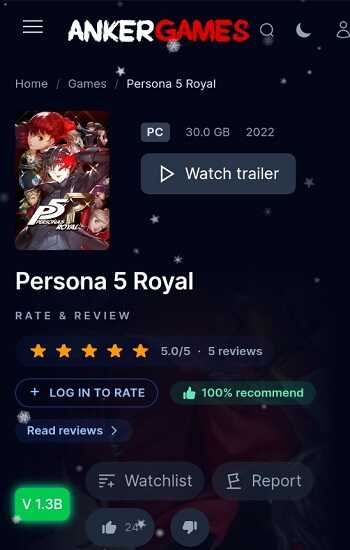
Before downloading, you can clearly see file sizes and version information. This transparency helps prevent wasted bandwidth and storage issues, especially with large titles that require careful planning.
Knowing the exact size of a game and whether additional content is included allows you to make informed decisions. For users managing multiple downloads or limited space, this clarity is not optional — it is essential.
Why This Download Model Saves Time and Reduces Errors
Every additional step in a process introduces potential failure points. Installers can fail due to missing components, interrupted downloads, or system conflicts. The download-and-extract model removes many of these risks.
By focusing on delivering finished files rather than guiding users through complex installation procedures, AnkerGames APK streamlines the experience. This efficiency is particularly valuable if you test multiple games or build and maintain an organized library.
When Direct Downloads Make the Most Sense
Direct downloads work best when you already know what you want, understand file structures, and have sufficient storage available. They are ideal for quick testing, archiving, or building a personal collection over time.
They are less suitable for beginners unfamiliar with PC game directories or users with limited storage capacity. Understanding when this model fits your situation helps you avoid frustration and make better use of the platform.
Common Mistakes Users Make When Downloading Large PC Games
The most frequent issues come from underestimating storage requirements, extracting files to incorrect locations, or assuming downloads can be played directly on Android. Large PC games require planning, and skipping that step often leads to unnecessary problems.
Recognizing these pitfalls early ensures a smoother experience and reinforces the importance of following the intended workflow.
Extract: Understanding Storage and File Handling
Extraction is a step many users underestimate, yet it plays a critical role in how smoothly the entire workflow runs. Compressed PC game files require additional space during extraction, often close to double the original archive size. If you do not plan for this, problems appear quickly.
Choosing the right destination folder matters. Extracting large games into limited internal storage can cause interruptions or incomplete files. External storage or well-organized directories help avoid these issues and make future access easier.
File structure is another important detail. Preinstalled PC games rely on their internal folder layout to function correctly. Moving or renaming files without understanding their purpose can break launch paths or configuration files later.
AnkerGames APK does not interfere with this step, and that is intentional. By leaving extraction and storage management in your hands, the platform gives you full control. This approach assumes a basic level of familiarity, but it also rewards careful handling with fewer long-term issues.
Advertisement
Play: Where AnkerGames Fits Into Your Setup
Playing a game happens outside AnkerGames APK. The app does not launch games, emulate systems, or stream content. Its role ends once files are downloaded and extracted.
Some users move extracted files to a PC and play directly. Others integrate them into more advanced setups involving compatibility layers or emulation tools. These choices depend entirely on your hardware, operating system, and personal preferences.
What matters is clarity. AnkerGames APK provides access, not execution. By staying neutral, the platform avoids imposing limitations or misleading expectations. You decide how and where games are played, using the tools you trust.
This separation keeps the workflow clean and predictable. You always know where AnkerGames APK fits — and where it does not.
Who AnkerGames APK Is Designed For
AnkerGames APK is designed for users who already understand PC games and file management. It works best for people who value efficiency and prefer direct access over guided experiences.
Typical users include:
-
PC gamers who want faster access without installation delays
-
Power users comfortable handling large files and storage planning
-
Emulator explorers experimenting with different environments
-
Digital collectors building structured libraries over time
If you recognize yourself in these scenarios, the platform’s workflow will feel natural. It respects your experience and avoids unnecessary explanations or restrictions.
Who AnkerGames APK Is NOT For
This platform is not intended for everyone, and that is not a weakness. It is simply honest about its focus.
AnkerGames APK may not suit you if:
-
You expect instant Android gameplay
-
You prefer one-tap solutions with no file handling
-
Your device has very limited storage
-
You are unfamiliar with PC game folders or compressed files
Knowing this upfront helps you decide without frustration. The platform works best when expectations match its design.
Strengths and Limitations at a Glance
AnkerGames APK offers a clear set of advantages rooted in its simplicity and transparency.
Key strengths include:
-
A straightforward workflow with minimal steps
-
Clear file size and version information
-
No forced accounts or launchers
-
Full user control over storage and usage
At the same time, the platform has limitations that come from the same philosophy.
Key limitations include:
-
No built-in execution or emulation
-
No beginner-focused guidance
-
Large storage requirements for many titles
These trade-offs are intentional. AnkerGames APK chooses clarity over convenience and trusts users to manage their own setups.
Why the “Browse, Download, Extract, Play” Model Works
This model works because it removes friction instead of adding layers. Each step has a clear purpose and follows a logical sequence that experienced users already understand.
You browse with precision, download without delays, extract with intention, and play using your preferred environment. Nothing is hidden, automated without consent, or locked behind unnecessary processes.
For users who value control, this workflow feels efficient and honest. It aligns with real habits rather than marketing promises, which is why it resonates with a specific but dedicated audience.
Final Thoughts
AnkerGames APK is a utility, not an entertainment app. It does not try to replace existing platforms or simplify every decision for you. Instead, it focuses on delivering direct access and stepping aside.
If you value transparency, efficiency, and control, this approach makes sense. If you prefer guided experiences or instant results, it may not.
For the right users, the simplicity of AnkerGames APK is not a limitation — it is the reason the platform works so well.
FAQs AnkerGames
AnkerGames APK is used to browse and download preinstalled PC game files through an Android device. It acts as a mobile access tool for a PC game distribution platform, allowing users to manage downloads, view game information, and transfer files for use in their own setup.
No. AnkerGames APK does not run or play games on Android. The app only provides access to PC game files. After downloading and extracting, games are played using external environments such as a PC or compatible tools chosen by the user.
Preinstalled PC games are complete game folders that have already gone through the setup process. They do not require installers or setup wizards. Once extracted, the files are ready to be used without additional installation steps.
AnkerGames APK is best suited for users who already understand PC games and file management. Beginners who expect one-tap gameplay or automatic setup may find the workflow unfamiliar, as it requires manual extraction and storage planning.
PC games are typically large in size, and compressed files need extra space during extraction. In many cases, users should plan for nearly double the game’s archive size to ensure a smooth extraction process without errors.






Share Your Thoughts